
FAQ Contoroller
Connection / configuration example
The initial setting/parameter of the controller (DS series)
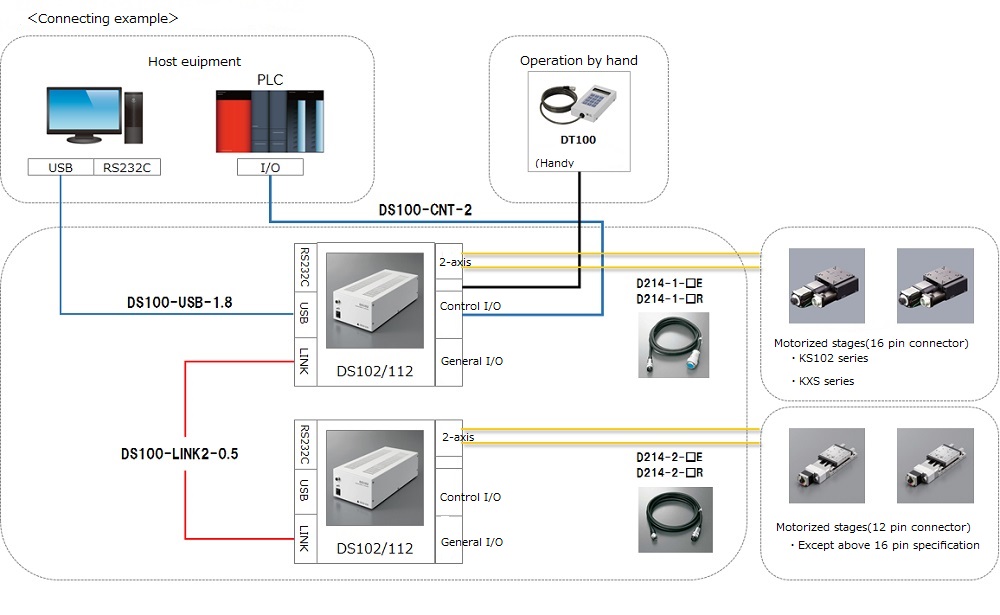
I connected the motorized stage, controller (DS series) and handy terminal (DT100).
There are various parameter settings, but what items need to be set at a minimum?
The following two points of the parameter (MENU → PRM) and the selection of the speed table (SPD) are required.
◆ "MENU" → "PRM" → "4. Unitset"
・ Unit (notation such as μm, mm, Puls ), setting of movement amount per pulse at full step,
number of driver divisions.
・ Check the resolution of the catalog spec and make settings.
◆ "MENU" → "PRM" → "5. Orgin Type"
・origin return type setting.
・ Set with reference to the recommended origin return type in the electrical specification (timing chart)
of the catalog.
◆ "SPD"
・In the drive mode screen, pressing the "SPD" button allows you to select the speed table number (0 to 9).
・The value set for each speed table number can be confirmed on P. 75 of the instruction manual,
or can be confirmed on “MENU” → “PRM” → “3. Speed Table”.
-In addition, it is also possible to change the setting of the speed table to any value
by parameter (PRM) setting.
Connection method of motorized stage and controller (DS system)
To control 4 axes, 2 of our controllers are required.
Connect the controllers with a dedicated link cable (model: DS100-LINK2-0.5).
Only one handy terminal is required, since commands to the controller are issued only to the controller
set as the master unit.
To control 4 axes, 2 of our controllers are required.
Connect the controllers with a dedicated link cable (model : DS100-LINK2-0.5).
Only one handy terminal is required, since commands to the controller are issued only to the controller set as the master unit.
Can I use a commercially available RS232C cable for connection between the controller and PC?
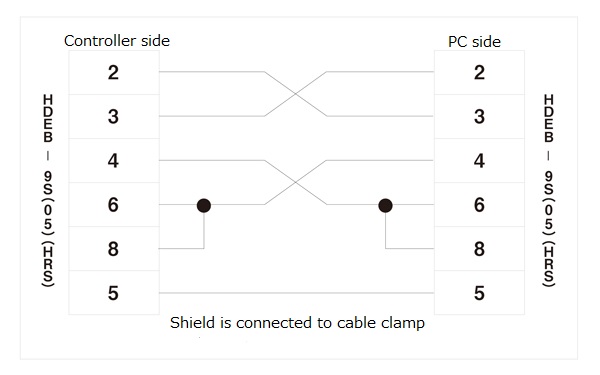
I am using a PC to move the controller, and am trying to make an RS232C cable connection.Is there any problem with a commercially available cable?
There is no problem as long as it is a cross cable.
Please refer to the following diagram. (D100-R9-2 drawing)
*Please note that it cannot drive with a straight cable.
Types of Controller / Driver
Type of DS Controller series
【DS102 / DS112 Series】 There are various types of DS controller series, such as
DS102, DS112, NR, MS, IO, etc. What is the difference between them?
◆ The difference between DS102 and DS112
The input power is different.
The DS102 is for AC power and the DS112 is for DC power.
◆ Differences between NR and MS (at the end of DS102A/DS112ANR and DS102A/DS112AMS)
Theis a difference in number of splits that can be switched.
The NR (Normal) type can switch between FULL step and HALF step only, and the MS (Micro Step) type
can switch between 16 steps.
◆ Difference due to the presence or absence of "-IO" at the end
This is a difference due to the presence or absence of general purpose input / output function (I / O).
In addition to the control input / output (CNT-I / O) functions included with all products, this is an
option to add general-purpose input / output functions.
【Control input / output (CNT-IO)】
Outputs the status of the motorized stage. In addition, you can specify the teaching point number
and program number, move the teaching point, and start and stop program driving.
By connecting this CNT-I / O to the I / O of PLC, motorized stage control can be easily performed from PLC.
【General-purpose input / output (I / O)】
A general-purpose input / output function with 16 inputs and 12 outputs for controlling various sensors,
switches, solenoid valves, and indicator lights .
It can be controlled by the handy terminal, control software and communication command.
Type of drivers
There are 2 type of products listed in the catalog, one made by Oriental Motor and one made by Technodrive. What is the difference between them? Are there any stages that can be used or not?
It is only the difference of whether it is in a case (box type) or not.As these are all compatible with Suruga Seiki products, there is no problem in selecting either product.
* Please check the instruction manual for details of the functions.
Old controller-related (Discontinued)
Use of the program created at D200 series controller
I used D200 series until now. I'm thinking about changing to the DS series, but is the program just fine?
* D200 series: D212, D221 to D226, D251 to D256
The command has been inherited as it is. However, due to differences in communication speed, etc., it can not always be used as it is.
Also, when using a stage with an electromagnetic brake such as “KS102-30E / Discontinued product”,special support is available. Please inquire for price and delivery time.
[D250 series] Can you drive simultaneously?
We have a controller (D250 series) that is currently out of production. I'm thinking of using it in a new experiment this time, can I drive simultaneously?
The D250 series has no simultaneous drive function.
Connectability of D92 series controller and currently sold motorized stages
I am using a PC to move the controller, and am trying to make an RS232C cable connection.Is there any problem with a commercially available cable?
The connector on the controller side is different from the one currently sold.If you have a cable (D70- □-□) that was sold before, you can connect it and use it.
Please contact out sales office about whether the current products can be controlled with D92.
Function, specifications
[DS102 / DS112 Series] Setting the speed on a sine waveform
[DS102 / DS112 Series]
Is it possible to gradually increase or decrease the speed instead of the fixed speed?
Our controller does not have speed setting function on a sine waveform.
Micro step (MS) compatibility of driver
[Driver] What is micro step compatibility?
It is a function that can set the movement amount per pulse finely by increasing the electrical resolution.
The division number setting is 16 patterns. (1,2,2.5,4,5,8,10,20,25,40,50,80,100,125,200,250)
* However, the actual following capability depends on the product. It is a standard of about 1/20 in the
linear motion stage. (Not covered by warranty)
[DS102 / DS112 Series] External dimensions
[DS Series] I would like to know the dimensions. Do you have CAD data?
CAD data of the controller is not available. Please refer to the external view of the instruction manual
for the dimensions.
3-axis linear interpolation drive with DSCONTROL-WIN
As for linear interpolation drive, it seems to be up to 2-axis interpolation in the command menu of
DSCONTROL-WIN.
Is there any way to do 3-axis linear interpolation?
Direct command input is required to drive 3-axis linear interpolation with DSCONTROL-WIN.
Use the GOLine command (see the instruction manual: p. 86).
* Linear interpolation between links (2nd and 3rd axes, 1st and 6th axes, etc.) is a simple interpolation.
The start of interpolation is less accurate than between units (axis 1 and axis 2).
How to print out the DSCONTROL-WIN program?
I want to print out the existing program at hand to fix the DSCONTROL-WIN program .
What should I do?
It is possible to print out the data saved in the PC with the save button
on the program screen if it is opened with Notepad.
* At that time, please note that the first line number of the program will be from 1.
Others: Windows11 etc.
Software support for Windows 11
Does DSCONTROL-WIN support to Windows11?
It supports Windows 11.Supported OS: Windows 10/11
USB driver for Windows 11 can be downloaded from the below link.
Failure diagnosis / error messages
Communication port error of DSCONTROL-WIN
When DSCONTROL-WIN is launched, the error ”Port not automatically detected” appears.
Is it a product defect?
It is not a defect of the product. It is an automatic search error of COM port number.Please rewrite the port number manually according to the following procedure.
(1) Please open the device manager. (Enter the device manager in the search box on the task bar)
(2) Check the □ number of “SURUGA SEIKI DS102 USB Serial Port (COM □)” directly under the port
(COM and LPT)
(3) Please open the setting file (DSControlWin.ini) in the following directory:
C:\Program Files\SURUGA\DSControlWin with a text editor such as Notepad.
(4) Rewrite the value of Port Number with the COM port number confirmed by the device manager,
close the file by overwriting it.
(5) Start DSCONTROL-WIN again.
[DS102 / DS112 Series] motor is not excited
The motor is not excited even when the power is turned on. The motor knob can be easily turned by hand.
【Possible cause】
Improper connection of motorized stage connection cable or power cable
【Action】
Check if the connection of motorized stage connection cable or power cable is correct.
[DS102 / DS112 series] The stage does not move
The power is on and the motor seems to be excited, but the stage does not move.
【Probable cause 1】
Emergency stop is working.
【Action 1】
Make sure that the "emergency stop input (EMS)" is not ON (the 2 pins of EMS connector are not open).
Please refer to DS102/112 Operation Manual page 70.
【Probable cause 2】
The setting of the DIP switch on the back is incorrect.
【Action 2】
Check the DIP switch setting in the instruction manual (P.76).
【Probable cause 3】
The sensor logic setting is incorrect.
For motorized rotary stages (KRE series), it is necessary to set the limit sensor to be normally open.
【Action 3】
Please confirm the sensor logic setting of the parameter.
【Probable cause 4】
The current down function is "OFF" (in the case of a normal driver).
【Action 4】
Switch the current down function to "ON". Please refer to the instruction manual page 94.
[DS102 / DS112 Series] actual travel distance is inconsistent with the setting
Actual travel distance does not match with the setting distance
【Probable Cause 1】
Unit setting error of parameters.
【Action 1】
Value to be set to STANDARD (ST) shall be the amount of movement per pulse of "full step setting,"
even if you change the setting of number of divisions.
Please set the value of each stage by referencing catalog, etc.
【Probable cause 2】
Only number of divisions on handy terminal is changed.
* In the case of micro-step type
【Action 2】
In the case of micro-step type (such as DS102AMS), if you want to change the number of divisions,
please change both the switch settings and the controller of the handy terminal.
[DS102 / DS112 series] The motor is hot while stopping
Even when the stage is not moving, the motor is very hot as the current does not decrease.
【Possible cause】
The current down function is "OFF" .
【Action】
Switch the current down function to "ON".
Motor (motorized stage) is out of step
The stage does not move and there is a noice from motor. It seems out of step.
【Probable cause 1】
The load is large. Or, the load fluctuation is large.
【Action 1】
Check if there is a large load fluctuation during operation.
If there is no problem by lowering the motor rotation speed which has higher torque,
it is necessary to review the load conditions.
【Probable cause 2】
The start pulse speed is too high.
【Action 2】
Reduce the start pulse speed, and reset it to a time that can be stably started.
【Probable cause 3】
The acceleration (deceleration) time is too short.
【Action 3】
Increase the acceleration (deceleration) time, and reset it to a time that can be stably started.
Motor vibration is large
I feel that the vibration of the motor is too big.
【Probable cause】
The motor of the motorized stage is resonating.
【Action】
When the driving pulse speed is changed and the vibration becomes smaller, the motor is
likely to be resonating.
Change the setting of driving pulse speed or install a clean damper (commercially available) to
suppress vibration.
Motor on motorized stage is too hot
It is so hot that I cannot even touch the motor.
【Probable cause 1】
The operation time is long.
【Action 1】
Reduce the operating time or increase the stop time. Please use motor case temperature
at 100 degrees or less.
【Probable cause 2】
The current down function is "OFF".
【Action 2】
Switch the current down function to "ON".
[DS102 / DS112 series] It does not move if multiple units are linked
I tried to link two controllers to move the 3 axes, but they did not move at all.
【Possible cause 1】
The setting of the DIP switch(slave/master) on the back is incorrect.
【Action 1】
Check the DIP switch setting in the instruction manual (page 119).
【Possible cause 2】
The power on procedure is incorrect.
【Action 2】
Please turn the power on in the following series: slave 2 > slave 1 >Master.
[DS102 / DS112 series] Motorized rotary stage: KRE series does not move
I tried to operate KRE06360/04360 with DS102 (112) but it does not move. Is it a breakdown?
When using the KRE series with the DS102 / 112, set the limit sensor logic to A (Normal Open).


